ES File Decrypter is a specialized app designed to unlock files encrypted by ES File Explorer. It's the perfect solution when you need to access your files but can't recall the original password. This tool allows you to quickly and efficiently regain access to your encrypted data, entirely without requiring the password.
Exploring ES File Decrypter in Detail
Managing encrypted files can be difficult in our digital age, particularly when passwords are lost. ES File Decrypter tackles this common problem head-on, offering a way to decrypt files from ES File Explorer without the original password. This overview examines the app’s functionality, usage, key features, design, user experience, strengths, and weaknesses.
A major advantage of ES File Decrypter is that it's completely free, making it an accessible solution for anyone facing file encryption troubles. The app is simple and intuitive, enabling users to decrypt their files without complicated steps or technical know-how.
Methods to Use
Using ES File Decrypter is a simple, step-by-step process. Here is a guide to effectively decrypt your files:
*Launching the App: Open the ES File Decrypter app. You’ll see a clean, intuitive interface designed to make decryption straightforward.
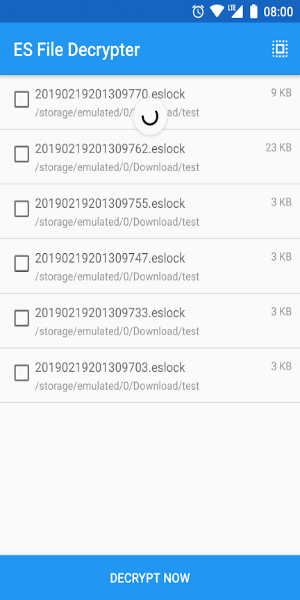
*Selecting Encrypted Files: Tap the option to choose the encrypted file(s) you want to decrypt. The app will guide you through your device's storage to locate them.
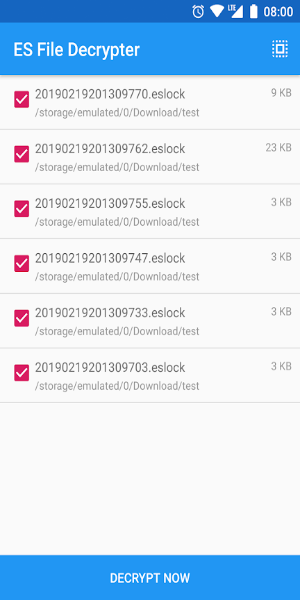
*Decryption Process: Once selected, start the decryption process. ES File Decrypter will work to unlock the file without the password. The duration depends on the file's size and encryption complexity.
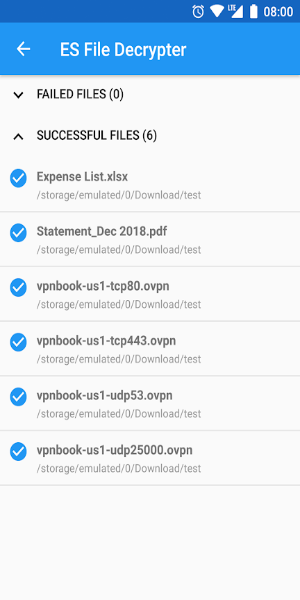
*Accessing Decrypted Files: After decryption is complete, you can access the unlocked file. The app typically lets you save it to a chosen location or open it directly.
*Handling Multiple Files: For multiple files, you can select and decrypt them in batches. This batch processing feature streamlines unlocking several files at once.
What Sets ES File Decrypter Apart?
ES File Decrypter includes several features that improve its utility and ease of use:
Password-Free Decryption: The app's core feature is decrypting files without the original password, making it invaluable if you've lost or forgotten it.
Free Access: ES File Decrypter is free of charge, offering an effective solution without any cost, ensuring anyone can use it.
User-Friendly Interface: Its simple, intuitive design makes navigation and decryption tasks easy, with clear instructions minimizing confusion.
Batch Processing: Decrypt multiple files simultaneously to save time, which is especially helpful for large numbers of encrypted files.
Compatibility: Designed specifically for files encrypted by ES File Explorer, ensuring a seamless decryption experience for those files.
Security and Privacy: The app prioritizes your privacy and data security during decryption. It does not store or misuse your decrypted files, keeping them confidential.
Design and User Experience
ES File Decrypter's design focuses on delivering a smooth and efficient experience. Key aspects include:
Clean Interface: A minimalist, clutter-free interface highlights essential functions, improving navigation and overall usability.
Guided Process: Clear instructions and prompts guide you through each decryption step, making the app accessible regardless of technical skill.
Responsive Performance: Optimized for speed, the app decrypts files quickly with minimal delays, ensuring a smooth operation.
Device Compatibility: The app works across a range of devices and operating systems, so users on different platforms can utilize its features.
Pros and Cons
Like any application, ES File Decrypter has strengths and areas for consideration. Here’s a balanced view:
Pros:
-Efficient Decryption: It efficiently decrypts files without the original password, a major benefit for users who have lost their passwords.
-Cost-Free: Being completely free makes it an accessible tool for anyone needing file decryption.
-Batch Processing: Decrypting multiple files at once saves significant time, particularly for users with many encrypted files.
-User-Friendly Design: The intuitive interface and guided process make it easy to use, even for non-technical users.
Cons:
-Limited File Support: The app is specifically for files encrypted by ES File Explorer. It won't work with files encrypted by other methods.
-Potential Security Risks: Although the app respects privacy, using any decryption tool carries inherent risks. Always download from a trusted source to avoid security issues.
Download Today and Transform Your Experience!
ES File Decrypter is a valuable, free tool for accessing encrypted files without the password. Its user-friendly design, batch processing, and compatibility with ES File Explorer make it a practical choice. While limited to specific file types and carrying potential security considerations, its overall functionality and accessibility make it a worthwhile addition to your toolkit. Download ES File Decrypter today to regain access to your files and simplify your file management.