Color Mods - Funny Test FNF Music Night. Over 100 Mod Tests and Over 350 Coloring Pages
Our game offers two distinct alternatives you can enjoy throughout the week, featuring independent developer modes for full Music Nights that cater to fans of these unique experiences.
The first option is a coloring game containing over three hundred Friday Night Funkin' funny night coloring pages. Here, you select colors by number and fill in the designated areas.
The second is a test version of the playground mode, allowing you to comfortably stress-test the sounds and animations of Friday Night Funkin' funny characters using the up, down, left, and right arrow keys.
In both game modes, you have the option to completely turn off sound effects and music if desired.
How to Play the FNF Music Night Characters Coloring Game?
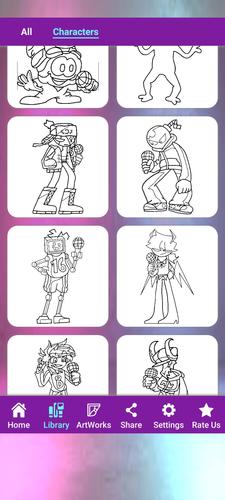
By pressing the coloring game button on the opening screen, you will be directed to a page featuring hundreds of Friday Night Funkin' mod coloring pages.
In addition to well-known characters such as Boyfriend, Girlfriend, Mommy Mearest, Miku, Agoti, and others, some scary Huggy Wuggy characters are also included in the collection.
To begin, select the picture of the FNF funny night mode character you wish to color; these images are drawn with black lines on a white background button.
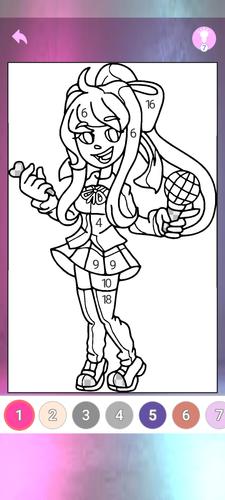
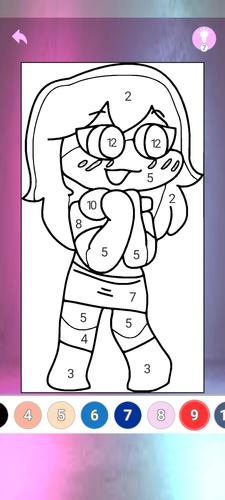
When you open a mod coloring page, you will see a large preview image at the top and dozens of numbered colors listed at the bottom.
Each number corresponds to one or more specific areas on the coloring page.
After selecting a color from the palette below, start painting by tapping on the corresponding grayed-out sections in the main view.
During Friday Night Funkin' mod coloring sessions, if you cannot see which area matches a certain color, use the hints located in the top-left corner.
When your free hints run out, watch a rewarded advertisement to continue coloring your battle night mode character exactly where you left off.
Upon completely finishing a character's design, you earn an additional hint as a reward.
If you aim to color all available modes in our game according to their numbers, it means you are fully ready for endless fun.
How Can You Play the FNF Night Funny Modes Playground Test Game?
By pressing the button featuring four directional arrows on the opening screen, you can enter the mode test experience.
You will encounter a list of buttons containing Friday to Monday night funny mode characters dancing with various rhythms and animations.
These characters include customized mod series such as sometimes scary-looking Huggy Wuggy, Kissy Missy, Mouse, Among Us crewmates, and fun night mode music characters you'll admire for their dance moves and sounds.
You may need to watch a rewarded advertisement to test certain FNF Music Night characters in playground mode.
To test an FNF night character, select one of the buttons on this screen to move to the next stage.
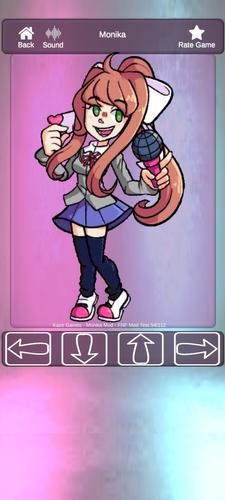
On the mode test screen, you will see arrow buttons in different colors at the bottom indicating four main directions.
If you do not press any buttons, the character mod will perform a light idle dance synchronized with the music rhythm.
When you tap any of the directional arrows, the FNF dancing character will switch to a specific dance figure and produce corresponding sounds.
You can try creating your own night battle music and choreography using the arrow controls below.
From the sound settings section, you can configure whether the mod character repeats the sound while holding down a button or plays it only once per press.
Enjoy testing FNF Music Night modes without any stress.
If you enjoy our FNF Friday Night Funkin' characters coloring and testing mode game, don't forget to share it with your friends using the share button.
Thank you for your wonderful comments and notifications.
What's New in the Latest Version 11
Last updated on Jul 1, 2024: Little Bugs Fixed
Coloring Page version added
SDK libraries upgraded
Icon changed due to coloring game integration














![Chubby Story [v1.4.2] (Localizations)](https://images.737c.com/uploads/85/1719638042667f981a5e9f8.jpg)