LINE is redefining communication, making it simple and free to stay close with family, friends, and loved ones. Enjoy voice and video calls, instant messaging, and an endless collection of fun stickers—so you can express yourself in creative new ways. Accessible globally on mobile, desktop, and Wear OS, LINE constantly evolves to bring you fresh features and services that add fun and convenience to your everyday life.

Features of LINE:
Messages, Voice Calls, Video Calls
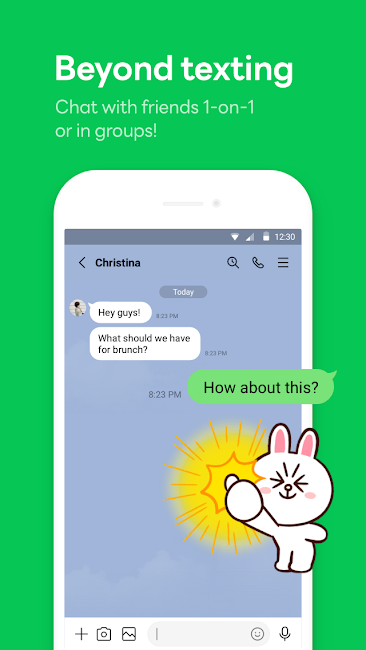
Stay in touch with LINE friends using different ways to communicate. Send smooth messages, make quick voice calls, or connect face-to-face via video. Whether chatting with friends, holding virtual meetings, or catching up, LINE makes communication simple across all your devices.
LINE Stickers, Emojis, and Themes
Make every message your own with LINE’s huge variety of stickers and emojis. Choose from a world of expressive characters and funny stickers to show how you're feeling. You can also customize the look of your LINE app with an exciting selection of themes, giving your chats a personal touch.
Home
Your Home screen is your personal command center on LINE. Easily manage your friends, keep up with birthdays, explore new stickers in the shop, and discover LINE services—all through a simple, easy-to-use interface. Find what you need quickly and stay connected to what’s important.
Seamless Connection on Mobile, Wear OS, and PC
LINE works perfectly across mobile, Wear OS, and PC. Keep your conversations going whether you're out and about or working from your computer. Stay connected on your phone, smartwatch, or desktop and enjoy smooth communication no matter which device you're using.
Store Your Personal Information with Keep Memo
Create a Keep Memo chatroom to save important messages, photos, and videos for later. Keep Memo provides a handy spot to organize and find information or media from your chats, so nothing important gets lost.
Messages Protected with Letter Sealing
LINE protects your privacy with Letter Sealing, which encrypts your chats, call records, and location data. Chat with confidence, knowing only you and your friends can access your conversations.
Smartwatch Integration
When using a Wear OS smartwatch, connect it with LINE to get message notifications right on your wrist. Add LINE’s app complication to your watch face so you can read and reply to messages easily—without ever taking out your phone.
Tips for Users:
1. Installation and Setup:
- Get the LINE app from your device's app store (Google Play Store for Android, App Store for iOS).
- Launch the app and create your account using your phone number or email address, following the simple on-screen steps.
2. Adding Friends:
- After logging in, you can send friend requests by searching for a LINE ID, scanning a QR code, or syncing your phone's contacts.
3. Messaging:
- Tap a friend’s name to start a conversation.
- Type your message and tap the send button.
- Add personality with emojis, stickers, and GIFs.
4. Voice and Video Calls:
- In any chat, tap the phone icon to start a voice call or the camera icon for a video call.
- Wait for your friend to accept, and you're ready to talk.
5. Exploring Features:
- Browse sections like Home to manage friends, check birthdays, and find new LINE services.
- Change the look of your app by picking themes in the theme shop.
6. Privacy and Security:
- Turn on Letter Sealing to keep your chats secure with encryption.
- Adjust notification and privacy settings to fit your needs.
7. Cross-Platform Access:
- Use LINE on smartphones, Wear OS smartwatches, and desktop computers to stay connected anywhere.
These guidelines give you a basic idea of how to use messaging and calling on LINE: Calls & Messages. For detailed instructions or help, check LINE’s official support or the in-app help section.
Conclusion:
LINE is a powerful and flexible communication platform, bringing together messaging, voice, and video features in one place. Its wide range of stickers, emojis, and themes lets you personalize your chats like never before. The Home screen keeps everything organized, helping you manage friends and services easily. No matter where you are—on your phone, smartwatch, or computer—LINE delivers stable connections. With tools like Keep Memo for saving personal content and Letter Sealing for top-notch privacy, LINE offers the ease, safety, and creativity today’s users need to stay connected across all their devices.