MU Immortal encapsulates the essence of classic MMORPGs, offering players the cherished experience of grinding levels, refining stats, and crafting their ideal characters. Although designed for mobile, the game's experience is significantly enhanced when played on a PC using BlueStacks. This platform provides a suite of tools that streamline and enrich your gameplay, allowing for smarter rather than harder play. From customizing controls to managing multiple characters simultaneously, these features transcend mere quality-of-life enhancements, offering a strategic advantage in your MU Immortal journey.
In this guide, we'll explore several key BlueStacks features and demonstrate how they seamlessly integrate with MU Immortal. Whether you're a newcomer or a veteran engaged in offline farming, these tools can significantly boost your gameplay.
Customize Your Controls and Shortcuts With the Keymapping Tool
The Keymapping Tool stands out as one of the most useful features in BlueStacks, particularly in a game like MU Immortal where managing skills, potions, and menus is a constant task. While the game caters to touchscreen inputs, transitioning to a keyboard and mouse setup enhances your precision and speeds up your access to crucial functions.
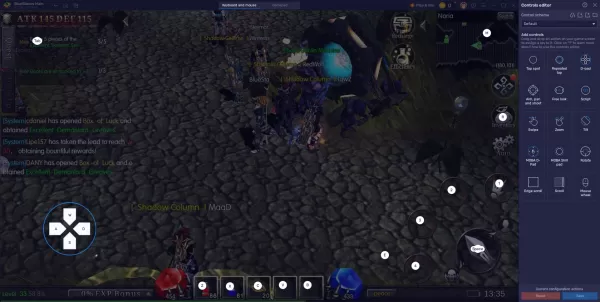
This tool is especially beneficial for players engaging in offline farming across multiple accounts. Ensuring each character is properly set up before you log off helps maintain consistent progress and resource generation across all your accounts.
MU Immortal offers an already optimized experience with features like auto-play and offline farming. However, playing on a PC with BlueStacks allows you to further refine your gameplay, aligning perfectly with the game's mechanics and your strategic goals.
If you're currently enjoying MU Immortal or considering diving in, don't limit yourself to mobile constraints. By downloading BlueStacks, you can experience a more efficient, faster, and highly customizable gaming environment on your PC. This will reduce the time you spend managing the grind and increase your enjoyment of the game.





![Chubby Story [v1.4.2] (Localizations)](https://images.737c.com/uploads/85/1719638042667f981a5e9f8.jpg)