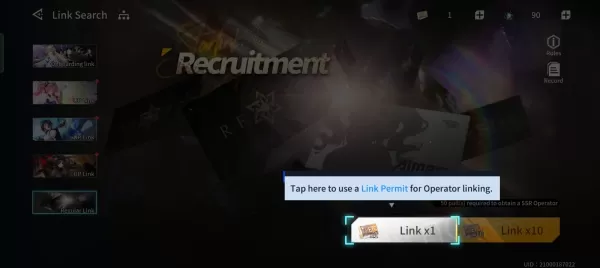
The gacha, or recruitment system, in Anchor Panic is at the heart of your Operator collection. Every battle you fight and every currency you earn eventually leads to pulling new Operators to strengthen your team. But with multiple currencies, different banners, and a pity system, it’s easy for beginners to waste resources without realizing it. This guide explains everything you need to know about recruitment, from how the system works to the best strategies for building your roster efficiently.
Understanding Link Search
The recruitment feature is called Link Search, and it offers two main options: Regular Link and UP Link. Regular Link allows you to pull from the standard pool of Operators, while UP Link banners highlight specific SSR Operators with boosted drop rates. To recruit, you need Regular Link Permits, which are consumed with each pull.
Each pull provides an Operator of varying rarity—R, SR, or SSR. While R Operators are common and often serve as fodder, SR and SSR Operators are the backbone of your squad. Regular Link banners are always available, but saving for UP Link banners is usually better, as they give you a higher chance of pulling the characters you want.

The gacha system in Anchor Panic is designed to reward both patience and strategy. By understanding how Link Search works, managing your Crystal Ashes, and taking advantage of the pity system, you can build a roster that balances immediate utility with long-term strength. Beginners should focus on securing Ling, using SR Operators to fill key roles, and saving resources for banners with high-value SSRs.
Avoiding impulsive pulls is the key—Anchor Panic rewards consistent, strategic recruitment, and every Permit you spend wisely brings you closer to building the ultimate squad. For the best gaming experience, play Anchor Panic on BlueStacks!






![Chubby Story [v1.4.2] (Localizations)](https://images.737c.com/uploads/85/1719638042667f981a5e9f8.jpg)