
You can now enjoy the thrilling world of *Fortnite Mobile* on your Mac! Dive into our comprehensive guide on how to play *Fortnite Mobile* on Mac with BlueStacks Air for a seamless gaming experience.
*Fortnite Mobile* is a renowned battle royale and sandbox survival game crafted by Epic Games. Central to the game's allure is the Fortnite Item Shop, an in-game marketplace where players can acquire a variety of cosmetic items to personalize their characters and enhance their gaming experience. The shop refreshes daily, presenting a fresh array of skins, emotes, pickaxes, and other items. This guide aims to equip you with a thorough understanding of the Item Shop's mechanics, the types of items available for purchase, how to acquire V-Bucks, and smart strategies to maximize your shopping experience.
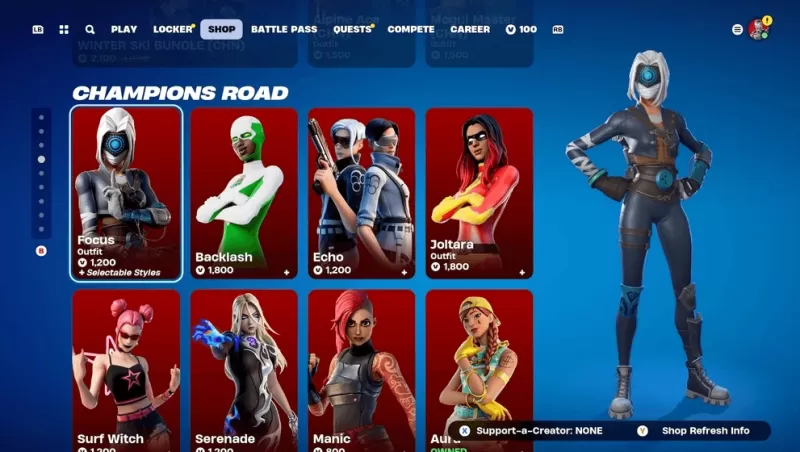
How to Access the Item Shop
Accessing the Item Shop is straightforward:
- Launch Fortnite on your preferred device, whether it's a PC, console, or mobile.
- From the main menu, navigate to and select the Item Shop tab.
- Explore the assortment of items, organized by type and bundled offers.
- Click on an item to delve into its details and explore purchase options.
The Item Shop undergoes a daily update at 00:00 UTC, ensuring a constant flow of new items while phasing out older ones.
Strategies for Smart Shopping
- Check Daily Rotations: Given the shop's 24-hour cycle, regular checks help you stay ahead and not miss out on desired items.
- Save for Rare & Special Skins: Limited-time event skins may not reappear for months or even years, making them worth the wait.
- Consider Battle Pass Over Single Purchases: The Battle Pass often provides superior value for your V-Bucks.
- Monitor Bundles: Some items are more cost-effective when purchased in bundles rather than individually.
- Use Websites for Predictions: If you're on the hunt for a specific item, shop prediction sites can be invaluable tools.
The Fortnite Item Shop stands as the epicenter of personalization within the game, offering a daily evolving selection of skins, emotes, and other cosmetic enhancements. By mastering how the shop functions, how to earn and judiciously spend V-Bucks, and implementing savvy shopping strategies, players can elevate their *Fortnite* experience to new heights. For Mac users eager to join the action, don't forget to explore our Download Guide to ensure a smooth installation of *Fortnite* on your system. Immerse yourself in *Fortnite Mobile* on your PC or laptop with the power of BlueStacks for an unparalleled gaming adventure!





![Chubby Story [v1.4.2] (Localizations)](https://images.737c.com/uploads/85/1719638042667f981a5e9f8.jpg)